
Run & Twerk Launcher APK for Android Download for Free

- Android 8.0 +
- Version: 1.0.2
- 76.6MB
Run & Twerk Launcher changes how your Android home screen looks and behaves by bringing game-inspired backgrounds, a customizable dock, and quick access to the Run & Twerk game. If you prefer playful visuals and a launcher tied to a single title, the launcher replaces your current home app and uses the game aesthetic throughout your phone. The Run & Twerk Launcher APK puts the game theme front and center while keeping standard app shortcuts and widgets available.
Expect a lightweight home replacement that focuses on style and convenience rather than adding complex system functions. You can pin your favorite apps, use a themed dock, and tap a dedicated shortcut to open Run & Twerk. If you like personalizing your phone with game art, this launcher adapts your wallpaper and icons to match the Run & Twerk look, while preserving the usual Android home workflows.
This launcher is intended for Android phones running the verified minimum of Android 8.0 and up. If you want to use Run & Twerk Launcher for Android and PC, remember the APK is built for Android only; to run it on a PC you must install a compatible Android emulator and then install the APK inside that emulator.
Key features you will use in Run & Twerk Launcher
The launcher keeps the basics you expect from a home replacement while adding a game skin and one-tap game access. Use the dock to store four or more shortcuts, and switch wallpapers that match the game mood.
- Game-inspired wallpapers and icons that match the Run & Twerk theme.
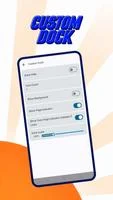
- Customizable dock for quick access to frequently used apps and the game.
- Dedicated shortcut to launch Run & Twerk directly from the home screen.
Run & Twerk Launcher is developed by Mini 1der World and installs like any third-party launcher. The verified package ID is com.mini1derworld.run.twerk and the app file is provided as an APK for manual installation when you choose to download it. Discover more options in Casual.
Practical tips to download Run & Twerk Launcher APK and run it smoothly
Before you get Run & Twerk Launcher APK, prepare your phone by freeing a few hundred megabytes of space and closing background downloads. This helps the APK transfer and install smoothly on Android 8.0 and newer devices.
- Confirm available storage before downloading to avoid interrupted downloads and to give the launcher room for wallpaper and cache files.
- Grant only the requested installation permission when Android prompts you, so the APK can install while keeping other sources blocked.
- After installing, set the launcher as default from Android settings or the first-run prompt, this ensures the custom dock and wallpapers load automatically.
If you plan to run Run & Twerk Launcher for Android and PC, install a mainstream Android emulator, then use the same APK install steps inside that emulator. Emulators replicate Android; they do not provide a native Windows launcher.
Frequently Asked Questions
-
How do I install APK and XAPK files?
For setup instructions and help with common installation issues, see our APK and XAPK installation FAQ.How can I update the game or app and keep my data?
Android can install an update over the existing app if the package name and signing certificate match. Back up your data before updating when the app supports backups.











Comments
No comments yet. Be the first to comment!